A product is not showing on my storefront
It is inactive, has no price, or has zero quantity.
Work through these four in order — it is almost always number 1 or 2.
1. Is the product Active?#
Open Inventory and look at the green toggle in the ACTIVE / SAVE column on the right of the row. If it is grey, the product is switched off and will never appear.
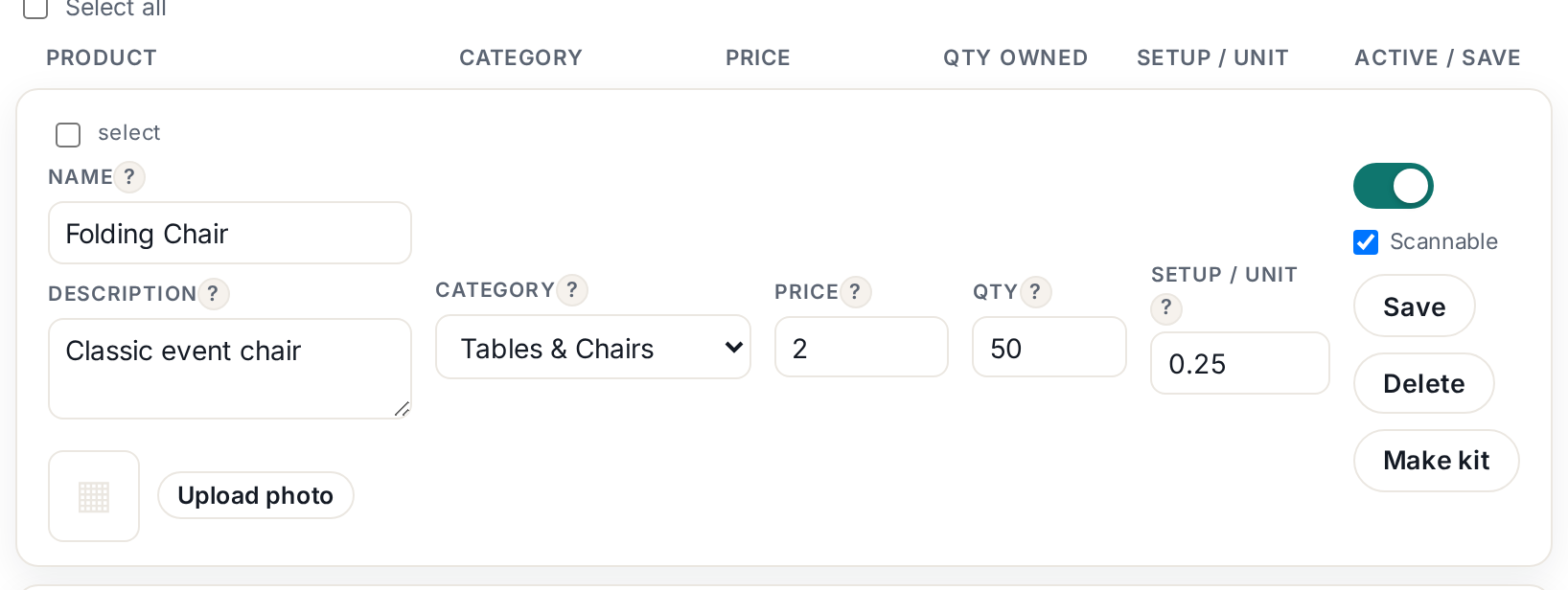 Tap to enlarge
This is the number one cause. Sample products and anything imported from the product library start switched off on purpose, so a placeholder photo and a guessed price can never reach a customer.
2. Does it have a price and a quantity?#
- Price must be set and above zero.
- Qty must be at least 1. Zero means you have nothing to rent, so it hides.
Fix either one, then click Save on that row.
3. Did you Publish?#
If you have built a custom page in the Website builder, changes are drafts until you hit Publish. That is deliberate — you can rework your site without customers seeing half-finished work.
4. Are you looking at a cached page?#
Open your storefront in a private/incognito window, or hard-refresh: Ctrl+Shift+R on Windows, Cmd+Shift+R on Mac.