Calendar view vs List view — which to use when
The Bookings tab has two views. List is for working the queue; Calendar is for seeing your month at a glance.
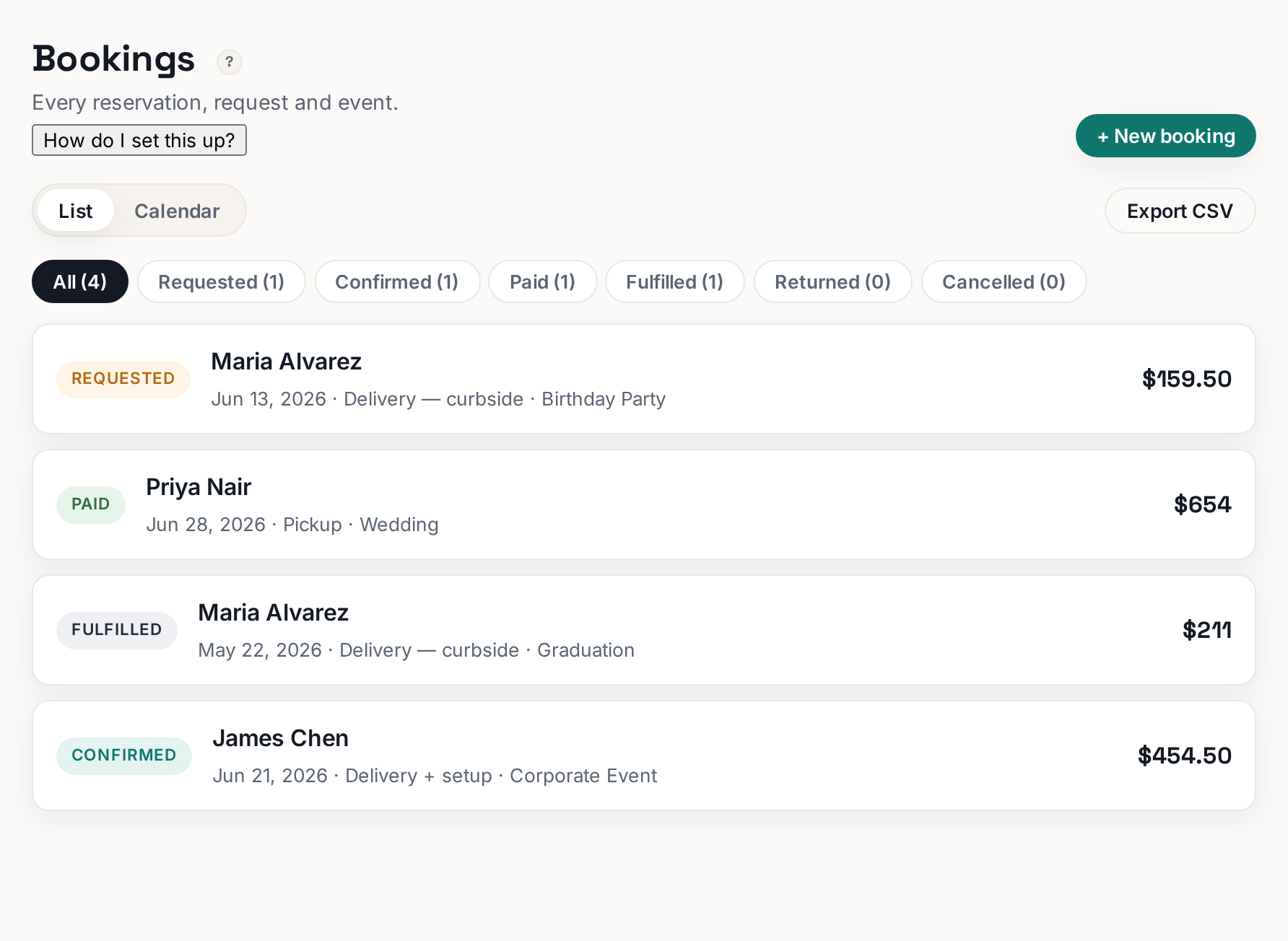
The Bookings tab has two views, switched with the List and Calendar buttons at the top: List shows every reservation in one scrolling queue, Calendar lays the same bookings out on a month grid by event date.
 Tap to enlarge
When List view wins#
List view is for working: new requests arrive at the top, and every row shows the customer, the event date, the total, and a colored status badge. Use the status filter to show only what needs action — filter to requests when you sit down in the morning, or to confirmed bookings when you are planning next week. Click any row to open the full booking detail.
When Calendar view wins#
Calendar view answers a different question: "how busy am I?" Each booking appears on its event date, so a stacked day jumps out immediately. Use it before you confirm a big order ("do I already have three deliveries that Saturday?"), and when a customer calls asking about a date. Click a booking on the grid to open the same detail drawer.
Two things to know#
- The views are the same data — nothing is ever only in one view. If a booking seems missing, check the status filter first, then confirm you are looking at the right month.
- The calendar places bookings by event date, not the date they were created. A request that came in today for an event in August lives on the August grid.